sobota, 6 października 2012

NAGIOS - windows


I. Overview
II. 4 steps to install nagios on remote windows host
  1. Install NSClient++ on the remote windows server
  2. Modify the NSClient++ Service
  3. Modify the NSC.ini
  4. Start the NSClient++ Service
III. 6 configuration steps on nagios monitoring server
  1. Verify check_nt command and windows-server template
  2. Uncomment windows.cfg in /usr/local/nagios/etc/nagios.cfg
  3. Modify /usr/local/nagios/etc/objects/windows.cfg
  4. Define windows services that should be monitored.
  5. Enable Password Protection
  6. Verify Configuration and Restart Nagios.

I. Overview

.
Following three steps will happen on a very high level when Nagios (installed on the nagios-server) monitors a service (for e.g. disk space usage) on the remote Windows host.
  1. Nagios will execute check_nt command on nagios-server and request it to monitor disk usage on remote windows host.
  2. The check_nt on the nagios-server will contact the NSClient++ service on remote windows host and request it to execute the USEDDISKSPACE on the remote host.
  3. The results of the USEDDISKSPACE command will be returned back by NSClient++ daemon to the check_nt on nagios-server.

Following flow summarizes the above explanation:

Nagios Server (check_nt) —–> Remote host (NSClient++) —–> USEDDISKSPACE
Nagios Server (check_nt) <—– Remote host (NSClient++) <—– USEDDISKSPACE (returns disk space usage)

II. 4 steps to setup nagios on remote windows host

.

1. Install NSClient++ on the remote windows server

Download NSCP 0.3.1 (NSClient++-Win32-0.3.1.msi) from NSClient++ Project. NSClient++ is an open source windows service that allows performance metrics to be gathered by Nagios for windows services. Go through the following five NSClient++ installation steps to get the installation completed.

(1) NSClient++ Welcome Screen

(2) License Agreement Screen

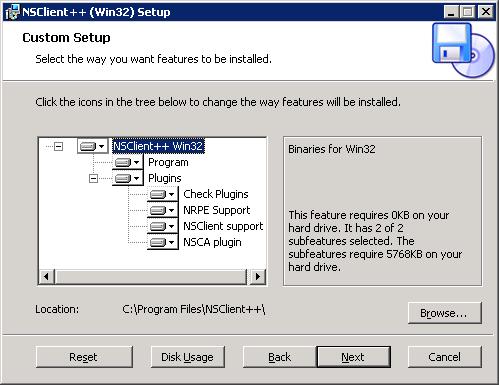
(3) Select Installation option and location. Use the default option and click next.

NSClient++ Install Screen

(4) Ready to Install Screen.  Click on Install to get it started.

(5) Installation completed Screen.

2. Modify the NSClient++ Service

Go to Control Panel -> Administrative Tools -> Services. Double click on the “NSClientpp (Nagios) 0.3.1.14 2008-03-12 w32″ service and select the check-box that says “Allow service to interact with desktop” as shown below.
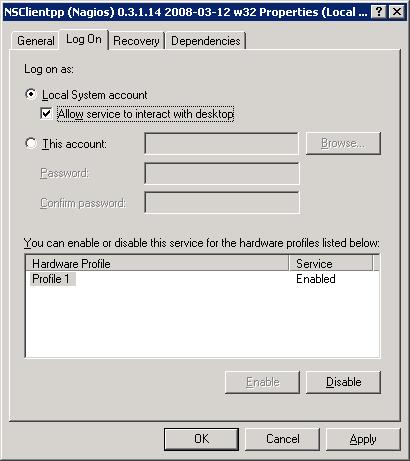
NSClient++ Service Modification


3. Modify the NSC.ini

(1) Modify NSC.ini and uncomment *.dll: Edit the C:\Program Files\NSClient++\NSC.ini file and uncomment everything under [modules] except RemoteConfiguration.dll and CheckWMI.dll
[modules]
;# NSCLIENT++ MODULES
;# A list with DLLs to load at startup.
;  You will need to enable some of these for NSClient++ to work.
; ! ! ! ! ! ! ! ! ! ! ! ! ! ! ! ! ! ! ! ! ! ! ! ! ! ! ! ! ! ! ! ! !
; *                                                               *
; * N O T I C E ! ! ! - Y O U   H A V E   T O   E D I T   T H I S *
; *                                                               *
; ! ! ! ! ! ! ! ! ! ! ! ! ! ! ! ! ! ! ! ! ! ! ! ! ! ! ! ! ! ! ! ! !
FileLogger.dll
CheckSystem.dll
CheckDisk.dll
NSClientListener.dll
NRPEListener.dll
SysTray.dll
CheckEventLog.dll
CheckHelpers.dll
;CheckWMI.dll
;
; RemoteConfiguration IS AN EXTREM EARLY IDEA SO DONT USE FOR PRODUCTION ENVIROMNEMTS!
;RemoteConfiguration.dll
; NSCA Agent is a new beta module use with care!
NSCAAgent.dll
; LUA script module used to write your own "check deamon" (sort of) early beta.
LUAScript.dll
; Script to check external scripts and/or internal aliases, early beta.
CheckExternalScripts.dll
; Check other hosts through NRPE extreme beta and probably a bit dangerous! :)
NRPEClient.dll

(2) Modify NSC.ini and uncomment allowed_hosts. Edit the C:\Program Files\NSClient++\NSC.ini file and Uncomment allowed_host under settings and add the ip-address of the nagios-server.
;# ALLOWED HOST ADDRESSES
;  This is a comma-delimited list of IP address of hosts that are allowed to talk to the all daemons.
;  If leave this blank anyone can access the deamon remotly (NSClient still requires a valid password).
;  The syntax is host or ip/mask so 192.168.0.0/24 will allow anyone on that subnet access
allowed_hosts=192.168.1.2/255.255.255.0
Note: allowed_host is located under [Settings], [NSClient] and [NRPE] section. Make sure to change allowed_host under [Settings] for this purpose.

(3) Modify NSC.ini and uncomment port. Edit the C:\Program Files\NSClient++\NSC.ini file and uncomment the port# under [NSClient] section
;# NSCLIENT PORT NUMBER
;  This is the port the NSClientListener.dll will listen to.
port=12489

(4) Modify NSC.ini and specify password. You can also specify a password the nagios server needs to use to remotely access the NSClient++ agent.
[Settings]
;# OBFUSCATED PASSWORD
;  This is the same as the password option but here you can store the password in an obfuscated manner.
;  *NOTICE* obfuscation is *NOT* the same as encryption, someone with access to this file can still figure out the
;  password. Its just a bit harder to do it at first glance.
;obfuscated_password=Jw0KAUUdXlAAUwASDAAB
;
;# PASSWORD
;  This is the password (-s) that is required to access NSClient remotely. If you leave this blank everyone will be able to access the daemon remotly.
password=My2Secure$Password

4. Start the NSClient++ Service

Start the NSClient++ service either from the Control Panel -> Administrative tools -> Services -> Select “NSClientpp (Nagios) 0.3.1.14 2008-03-12 w32″ and click on start (or) Click on “Start -> All Programs -> NSClient++ -> Start NSClient++ (Win32) . Please note that this will start the NSClient++ as a windows service.

Later if you modify anything in the NSC.ini file, you should restart the “NSClientpp (Nagios) 0.3.1.14 2008-03-12 w32″ from the windows service.

III. 6 configuration steps on nagios monitoring server

.

1. Verify check_nt command and windows-server template

Verify that the check_nt is enabled under /usr/local/nagios/etc/objects/commands.cfg
# 'check_nt' command definition
define command{
command_name    check_nt
command_line    $USER1$/check_nt -H $HOSTADDRESS$ -p 12489 -v $ARG1$ $ARG2$
}

Verify that the windows-server template is enabled under /usr/local/nagios/etc/objects/templates.cfg
# Windows host definition template - This is NOT a real host, just a template!
define host{
name                    windows-server  ; The name of this host template
use                     generic-host    ; Inherit default values from the generic-host template
check_period            24x7            ; By default, Windows servers are monitored round the clock
check_interval          5               ; Actively check the server every 5 minutes
retry_interval          1               ; Schedule host check retries at 1 minute intervals
max_check_attempts      10              ; Check each server 10 times (max)
check_command           check-host-alive        ; Default command to check if servers are "alive"
notification_period     24x7            ; Send notification out at any time - day or night
notification_interval   30              ; Resend notifications every 30 minutes
notification_options    d,r             ; Only send notifications for specific host states
contact_groups          admins          ; Notifications get sent to the admins by default
hostgroups              windows-servers ; Host groups that Windows servers should be a member of
register                0               ; DONT REGISTER THIS - ITS JUST A TEMPLATE
}

2. Uncomment windows.cfg in /usr/local/nagios/etc/nagios.cfg

# Definitions for monitoring a Windows machine
cfg_file=/usr/local/nagios/etc/objects/windows.cfg

3. Modify /usr/local/nagios/etc/objects/windows.cfg

By default a sample host definition for a windows server is given under windows.cfg, modify this to reflect the appropriate windows server that needs to be monitored through nagios.
# Define a host for the Windows machine we'll be monitoring
# Change the host_name, alias, and address to fit your situation

define host{
use             windows-server              ; Inherit default values from a template
host_name   remote-windows-host      ; The name we're giving to this host
alias            Remote Windows Host     ; A longer name associated with the host
address       192.168.1.4                   ; IP address of the remote windows host
}

4. Define windows services that should be monitored.

Following are the default windows services that are already enabled in the sample windows.cfg. Make sure to update the host_name on these services to reflect the host_name defined in the above step.
define service{
use                     generic-service
host_name               remote-windows-host
service_description     NSClient++ Version
check_command           check_nt!CLIENTVERSION
}
define service{
use                     generic-service
host_name               remote-windows-host
service_description     Uptime
check_command           check_nt!UPTIME
}
define service{
use                     generic-service
host_name               remote-windows-host
service_description     CPU Load
check_command           check_nt!CPULOAD!-l 5,80,90
}
define service{
use                     generic-service
host_name               remote-windows-host
service_description     Memory Usage
check_command           check_nt!MEMUSE!-w 80 -c 90
}
define service{
use                     generic-service
host_name               remote-windows-host
service_description     C:\ Drive Space
check_command           check_nt!USEDDISKSPACE!-l c -w 80 -c 90
}
define service{
use                     generic-service
host_name               remote-windows-host
service_description     W3SVC
check_command           check_nt!SERVICESTATE!-d SHOWALL -l W3SVC
}
define service{
use                     generic-service
host_name               remote-windows-host
service_description     Explorer
check_command           check_nt!PROCSTATE!-d SHOWALL -l Explorer.exe
}

5. Enable Password Protection

If you specified a password in the NSC.ini file of the NSClient++ configuration file on the Windows machine, you’ll need to modify the check_nt command definition to include the password. Modify the /usr/local/nagios/etc/commands.cfg file and add password as shown below.
define command{
command_name check_nt
command_line $USER1$/check_nt -H $HOSTADDRESS$ -p 12489 -s My2Secure$Password -v $ARG1$ $ARG2$
}

6. Verify Configuration and Restart Nagios.

Verify the nagios configuration files as shown below.
[nagios-server]# /usr/local/nagios/bin/nagios -v /usr/local/nagios/etc/nagios.cfg

Total Warnings: 0
Total Errors:   0

Things look okay - No serious problems were detected during the pre-flight check

Restart nagios as shown below.
[nagios-server]# /etc/rc.d/init.d/nagios stop
Stopping nagios: .done.

[nagios-server]# /etc/rc.d/init.d/nagios start
Starting nagios: done.

Verify the status of the various services running on the remote windows host from the Nagios web UI (http://nagios-server/nagios) as shown below.

czwartek, 20 września 2012

pfSens install vmtools


First, we need to install "perl" and "compat6x-i386" onto the system prior VMware Tools installation, just like other linux. But there are many catches through the path... and this guide solved all these and goes straight to the result.
--> press "8" and go to the Shell of pfsense.
We need to update the FTP path for pkg_add command, otherwise the package won't fetch (coz the pfsense FreeBSD is not so updated to FreeBSD FTP)!
setenv PACKAGEROOT "ftp://ftp.freebsd.org"
setenv PACKAGESITE "ftp://ftp.freebsd.org/pub/FreeBSD/ports/i386/packages-7.4-release/Latest/"
Start installing packages:
pkg_add -v -r perl
pkg_add -v -r compat6x-i386
Go to VMware vsphere client, and start "Install VMware Tools" onto the pfsense-VM, as usual, we need to mount the CD-ROM in order to get the VMware Tools executable.
First, we create some tmp folders first for VMware Tools:
cd /
mkdir tmp2
mkdir tmpp
Mounting the CD-ROM to tmp2:
mount_cd9660 /dev/acd0 /tmp2
cd /tmp2
Copy the VMware Tools to tmpp, then extract the package:
cp vmware-freebsd-tools.tar.gz /tmpp
cd /tmpp
tar -zxvf vmware-freebsd-tools.tar.gz
cd vmware-tools-distrib/
Then, here is the catch, before executing the installation, we need to link the compat6x files to the proper directory for VMware Tools to find, otherwise it just doesn't work!
ln -s /usr/local/lib/compat/libm.so.4 /lib
ln -s /usr/local/lib/compat/libc.so.6 /lib
ln -s /usr/local/lib/compat/libthr.so.2 /lib
Then, start the installation, make sure you are under /vmware-tools-distrib.
chmod +x vmware-install.pl bin/vmware-config-tools.pl bin/vmware-uninstall-tools.pl
./vmware-install.pl
As usual, keep pressing "Enter", and it should work with "Enjoy" message. If so, start cleaning up and reboot:
cd /
rm -r /tmpp/
rmdir tmpp
shutdown -r now

wtorek, 11 września 2012

Wiersz poleceń Windows


Wiersz poleceń

Wstęp

To jest artykuł o standardowym – odziedziczonym z wcześniejszych wersji systemu Windows a nawet z MS-DOSa – wierszu poleceń (powłoce) Windows 7, czylicmd.exe. Zapewne większość wymienionych tu poleceń będzie działało w starszych wersjach Windows.

Kruczki i sztuczki

Szybkie otwieranie konsoli tekstowej z bieżącym katalogiem: przejdź do żądanego folderu w oknie Eksploratora. Przytrzymując naciśnięty klawiszShift, kliknij ikonę folderu prawym przyciskiem myszy i wybierz polecenie Otwórz okno polecenia tutaj (niedostępne w Windows XP).
Szybkie pobieranie ścieżki do pliku: w Eksploratorze Windows wciśnij Shift i z menu kontekstowego wybierz Kopiuj jako ścieżkę. Żeby wpisać ścieżkę do pliku w wierszu poleceń można również przeciągnąć plik z Eksploratora Windows do powłoki.
Podczas wpisywania ścieżek dostępu zarówno w Eksploratorze jak i wierszu poleceń można zamiennie używać znaku backslasha i slasha.
Max. długość polecenia w wierszu poleceń: 8191 znaków.
Przydatne skróty klawiaturowe
Ctrl+Homeusuwa znaki stojące przed kursorem aż do początku wiersza
Ctrl+Endusuwa znaki stojące przed kursorem aż do końca wiersza
Ctrl+Zznak EOF (czyli odpowiednik Ctrl+D z Linuxa)
Ctrl+Break lub Ctrl+Cprzerywa działanie skryptu
Niektóre polecenia wiersza poleceń muszą być uruchamiane w trybie administratora. Aby uruchomić cmd.exe w trybie administratora kliknij na ikonce programu na pulpicie (lub w menu Start) prawym klawiszem myszy i wybierz opcję Uruchom jako Administrator.
Otwieranie konsoli na pełny ekran:
  1. utwórz skrót do cmd na pulpicie,
  2. odpal wiersz poleceń ze skrótu i wykonaj polecenie: wmic,
  3. zmaksymalizuj okno – powinno otworzyć się na cały ekran,
  4. żeby za każdym razem otwierał się na cały ekran: wejdź we właściwości skrótu, zaznacz opcję Quick edit mode.
W niektórych systemach Alt+Enter w oknie konsoli maksymalizuje okno na pełny ekran.

Podstawy

Typowe znaczenie opcji:
  • /? – wyświetla krótką pomoc na temat dostępnych opcji
  • /Q – tryb „cichy” – bez wypisywania na ekran
  • /S – rekurencyjnie
help polecenie
odpowiednik man w Linuksie; wyświetla pomoc na temat polecenia; poleceniem może być np. „if„; bez parametru wymienia wszystkie dostępne polecenia. Patrz także Command Line Reference
Instrukcja goto:
  :DALEJ
  ...
  GOTO DALEJ
polecenie1 & polecenie2
sekwencyjne wykonanie poleceń niezależnie od ich wyników
polecenie1 && polecenie2
wykonuje polecenie2 pod warunkiem że jego poprzednik wykonał się poprawnie
polecenie1 || polecenie2
wykonuje polecenie2 pod warunkiem że jego poprzednik wykonał się z błędem
dir > nul
to samo co ls > /dev/null w Linuxie
rem napis
komentarz
@polecenie opcje
wyświetla na stdout tylko wynik polecenia, bez samego polecenia
@echo off
od tej pory wykonywane polecenia nie będą wypisywane na stdio
%1
wartość pierwszego parametru skryptu wsadowego
FOR %%B IN (A B C) DO ECHO %%B
pętla for
for %f in (*.doc) do find „Gwiazdka” „%f”
szuka napisu „Gwiazdka” we wszystkich plikach *.doc bieżącego katalogu
for /r %w in (*.*) do echo %w
trawersuje drzewo katalogów i wyświetla ścieżki do wszystkich katalogów w drzewie
for /l %w in (1,2,10) do echo %w
iteruje zmienną w od 1 do 10 co 2
if [not] ERRORLEVEL zmienna polecenie [else polecenie2]
jeśli kod błędu ostatnio zwróconego polecenia był >= od podanej liczby
if [not] str1==str2 polecenie [else polecenie2]
jeśli podane ciągi są identyczne
if /I str1 op str2 polecenie
op to jedno z: equ/new/lss/leq/gtr/geq; opcja /I ignoruje wielkość liter
if [not] EXIST nazwa_pliku polecenie [else polecenie2]
jeśli wskazany plik istnieje
start katalog
uruchamia Eksplorator Windows dla wskazanego katalogu
start /B skrypt.bat
uruchamia skrypt bez otwierania nowego okna
call skrypt.bat params
uruchamia skrypt z wnętrza innego skryptu
cls
czyści ekran
date /t
wyświetla bieżącą datę
doskey /history
wyświetla historię wykonanych poleceń
doskey copy=copy /v $1 $2
definiuje makro (coś w rodzaju aliasu w Bashu w Linuxie); od tej pory każde użycie poleceniacopy będzie dodatkowo wykonywało weryfikację poprawności kopii
pause
czeka na naciśniecie dowolnego klawisza

Ciekawe polecenia

System plików

cd \
przechodzi do katalogu głównego bieżącego dysku
rename *2009* *2010*
podmienia łańcuchy w nazwach plików (UWAGA: stara nazwa plików i nowa musi być tej samej długości, chyba że zmiana pojawia się na końcu pliku)
xcopy
dużo bardziej rozbudowana wersja copy
xcopy *.doc g
\dokumenty /s: kopiuje wszystkie pliki o rozszerzeniu *.doc w bieżącym katalogu oraz podkatalogach do katalogu g:/dokumenty, gdzie zostanie utworzona analogiczna struktura katalogów
xcopy %userprofile%\documents\*.doc \\server\users\%username% /d
08-23-2007: kopiuje pliki *.doc które zostały zmodyfikowane danego dnia lub później
xcopy /s /h /r /i /d /y folder_zrodlowy folder_docelowy
tworzy lub aktualizuje kopię zapasową uwzględniając podkatalogi (/s), kopiując tylko nowsze pliki (/d), w tym pliki ukryte (/h) i nie pytając o potwierdzenie (/y)
Inne ciekawsze opcje:
  • /E - kopiuje również puste katalogi
  • /EXCLUDE:plik - określa listę plików zawierających ciągi; każdy ciąg powinien być w osobnym wierszu w plikach; jeżeli jakiś ciąg pasuje do dowolnej części ścieżki absolutnej kopiowanego pliku, plik ten nie zostanie skopiowany; na przykład, określenie ciągu postaci \obj\ lub .obj spowoduje odpowiednio wykluczenie wszystkich plików w podkatalogu obj lub wszystkich plików z rozszerzeniem *.obj.
  • /T - generuje strukturę katalogów, ale nie kopiuje plików
robocopy folder_zrodlowy folder_docelowy /mir
tworzy lustrzaną (1:1) kopię drzewa katalogów (zauważ, że polecenie xcopy nie usuwa z katalogu docelowego plików, których nie ma w folderze źródłowym)
tree
rysuje w trybie tekstowym drzewo katalogów zakorzenione w bieżącym katalogu
rd /s /q katalog
usuwa całe drzewo katalogów nie pytając o nic
del /s /q katalog
to samo, ale del można użyć do usuwania pojedynczych plików; usunięcie pliku oznacza jedynie oznaczenie ich jako usunięte (pierwszy znak nazwy pliku jest zmieniany na znak o kodzie heksadecymalnym E5) i następne operacje zapisu mogą zniszczyć zawartość tak oznaczonego pliku
type notatka.txt | more
wyświetla zawartość pliku z podziałem na strony
find /n /i /v "0-700" polaczenia.txt
coś jak UNIXowy grep: przeszukuje plik wyświetlając wiersze i numery wierszy (\n) nie pasujące (\v) do podanej frazy, przy czym wielkość liter we wzorcu nie ma znaczenia (opcja\i); opcja \c wyświetliłaby wyłącznie liczbę wierszy zawierający szukany ciąg
findstr
potężniejszy braciszek find'a; można wyszukiwać wyrażenia regularne (/r), szukać rekurencyjnie (/s) we wskazanych katalogach (/D)
sort /+3 /r spis.txt
sortuje plik począwszy od 4-go znaku w każdym wierszu i odwraca kolejność przy wypisywaniu posortowanych wierszy na stdout
dir /os /q /tc
listing katalogu z plikami posortowanymi według wielkości; opcja /q powoduje wyświetlanie właściciela każdego pliku, a /tc daty utworzenia (a nie ostatniej modyfikacji)
ftype txtfile=C
\mojprogram.exe : powoduje że domyślnie wszystkie pliki tekstowe będą otwierane wskazanym programem, a nie Notepadem
assoc .txt
pokazuje typ pliku skojarzonego z rozszerzeniem *.txt
attrib -R katalog /S
usuwa atrybut "tylko do odczytu" ze wszystkich plików drzewa katalogów o korzeniu w wyznaczonym katalogu
icacl plik
wyświetla uprawnienia do wskazanego pliku (lista kontroli dostępu ACL)
copy a.txt+b.txt c.txt
plik c.txt zawiera połączoną zawartość kopii plików a.txt i b.txt
ren *.htm *.html
zmiana nazwy wszystkich plików w katalogu bieżącym z *.htm na *.html
subst f
\\sekwoja\home : mapowanie katalogu na nową literę dysku
mountvol /n
uniemożliwia automatyczne montowanie urządzeń (np. gwizdka); aby je przywrócić użyj opcji/e
diskpart.exe
zarządzanie dyskami (manipulacja partycjami i woluminami (np. tworzenie RAID-5), formatowanie itp.) - otwiera własny wiersz poleceń z komendami np.
list disk
wyświetla listę dysków
select disk 2
kolejne operacje będą wykonywane na dysku nr 2
help
lista dostępnych poleceń
select help
opis polecenia select
convert.exe F
/FS:NTFS : konwersja FAT32 do NTFS (nie ma narzędzia do konwersji odwrotnej!)
defrag.exe
analiza i defragmentacja dysków
ChkDsk.exe
sprawdzanie integralności systemu plików
mklink /d fotki \\serwer\fotki
tworzy łącze symboliczne Fotki w bieżącym folderze, lecz folder docelowy leży na dysku sieciowym
Cipher.exe
szyfrowanie plików (EFS)
cipher.exe /E tajny.doc
szyfrowanie pliku
cipher.exe /C tajny.doc
informacje o szyfrowaniu (rodzaj algorytmu, długość, klucza, kto ma dostęp itp.)
cipher.exe /D tajny.doc
deszyfracja
cipher.exe /D /H /I /S
C:\: deszyfracja wszystkich plików partycji C: z uwzględnieniem podkatalogów, a także plików ukrytych i systemowych
Compact.exe
kompresja katalogów i plików (w sposób przezroczysty dla użytkownika)
Compact /S /C MojKatalog
kompresja drzewa katalogów
Compact /S /U MojKatalog
dekompresja drzewa katalogów
Expand.exe
dekompresja katalogów i plików spakowanych compact'em (można tym również wyodrębniać pliki z archiwów *.cab)
SFC.exe
skanuje integralność wszystkich chronionych plików systemowych i opcjonalnie zastępuje niepoprawne wersje plików poprawnymi wersjami firmy Microsoft
sfc.exe /SCANNOW
skanuje system plików (może potrwać parę minut)

Procesy

qprocess
wyświetla listę procesów
tskill pid
zabija proces o podanym PIDzie
TaskList.exe
wyświetla listę procesów
tasklist /SVC
wyświetla usługi obsługiwane w każdym z procesów
sc.exe
zarządzanie usługami

Sieć

getmac
wyświeta MAC-adresy kart sieciowych
netstat -b
wyświetla informacje o połączeniach sieciowych - dla każdego nazwa programu który to połączenie obsługuje (wymaga uprawnień administratora)
netstat -e
wyświetla statystyki dotyczące połączenia sieciowego
netstat -a
wyświetla wszystkie połączenia sieciowe i porty nasłuchujące
NetSh.exe
zarządzanie siecią (np. definiowanie adresu IP, adresu serwera DNS itp.)
NetSh.exe interface set interface name=LAN admin=disabled
wyłącza kartę sieciową o nazwie LAN
NetSh.exe interface ip show config
informacje o połączeniach sieciowych
netsh firewall set service type=remoteadmin mode=enable
wykonane na maszynie lokalnej pozwala maszynom zdalnym na zdalną administrację lokalnym komputerem
IPConfig.exe
testowanie ustawienia sieci TCP/IP
IPConfig /all
informacje na temat sprzętu sieciowego i jego konfiguracji
IPConfig /release
zwalnia dzierżawę DHCP
IPConfig /renew
odnawia dzierżawę DHCP
IPConfig /displaydns
wyświetla zawartość cache DNS
IPConfig /flushdns
czyści cache DNS
DJoin.exe
spinanie komputera z domeną ActiveDirectory
ARP.exe
obsługa tabeli translacji adresów IP do adresów fizycznych
arp -a
zawartość pamięci podręcznej protokołu ARP
Route.exe
administracja lokalną tablicą rutingu
route print -4
tablica rutingu dla IP w wersji 4
TraceRT.exe
badanie hostow na drodze do hosta (np. zeby ustalic gdzie zapora blokuje pakiety)

Informacje o systemie

SystemInfo
dane o systemie
TypePerf
pozwala monitorować (próbkować) różne aspekty systemu (pamięć, procesor, itp.) a wyniki zrzucać na ekran
GPResult /h x.html
zapisuje w pliku HTML aktualne zasady grupy; szczególną rolę odgrywa w nim dolna część zawierająca sekcje Ustawienia komputera i Ustawienia użytkownika
winsat disk -seq -write -drive c
mierzy prędkość zapisu danych na dysku C

Inne

schtasks /Create /SC ONSTART /TN moje_zadanie /TR C
\mojplik.bat : tworzy w harmonogramie zadań zadanie o nazwie "moje_zadanie", uruchamiane przy starcie systemu
driverquery /v
informacje o zainstalowanych sterownikach (opcja /v wyświetla więcej szczegółów)
eventcreate
służy do tworzenia wpisów w pliku dziennika
Reg
pozwala przeszukiwać rejestr, oraz modyfikować, eksportować, importować oraz porównywać klucze rejestru
Whoami /all
informacje o użytkowniku (grupy, uprawnienia, itp.)
SchTasks.exe
zarządzanie harmonogramem systemu
WEvtUtil.exe
dostęp do dziennika zdarzeń
wmic.exe
informacje o zasobach systemu (aplikacjach, usługach, itp.), w tym również systemu zdalnego
wmic.exe /OUTPUT
"F:\Programy.html" /NODE: "localhost" PRODUCT GET /FORMAT: "HForm": wypluwa do pliku HTML informacje o wszystkich zainstalowanych programach
wmic.exe /OUTPUT
"F:\BledneLogowanie.html" NTEVENT WHERE "EVENTTYPE=5 AND LOGFILE='SECURITY'" /FORMAT: "HTable": informacje dotyczące niepowodzenia logowania
Net.exe
zarządzanie kontami (net accounts), grupami (net localgroup), udziałami (net share), itp.
Net start/stop/pause/continue "Bufor wydruku"
zarządzanie usługami z wiersza polecen; net start wyswietla liste dzialajacych uslug
Net user
lista uzytkownikow
Net user piotrek
informacje o koncie
Net share
wyświetla udziały udostępniane przez lokalny komputer
Net config server /hidden
yes: (z uprawnieniami administratora) ukrywa zasoby komputera w sieci lokalnej
SchTasks.exe
harmonogram zadań

Zmienne środowiskowe

path
wyświetla zawartość zmiennej środowiskowej PATH

Ciekawsze zmienne środowiskowe

  • UserProfile: katalog domowy aktualnie zalogowanego użytkownika
  • SystemRoot: katalog Windowsów (np. C:\Windows)
  • CopyCmd: jeśli ustawimy wartość na "/Y", to zablokujemy wyświetlanie pytania o nadpisywanie plików w poleceniach XCOPY, COPY i MOVE
  • Username: nazwa aktualnie zalogowanego użytkownika
  • ComputerName: nazwa komputera
  • HomeDrive: napęd na którym znajdują się konta użytkowników
  • ProgramFiles: "C:\Program Files"
  • Temp: katalog plików tymczasowych
  • UserDomain : nazwa domeny z której pochodzi bieżący użytkownik
  • PathExt : lista rozszerzeń akceptowanych jako programy do wykonania

Kurs Lotus Notes

Podstawowe polecenia

restart server
show server
show task
load compact
load replica - replica baz (push wypchnij / poll pobierz) - wypcjnij zmian baz i wyrównanie (można uruchomić kilka jeśli jest dużo baz)

tell replica q - zamknij replica
tell route q - wył. wysyłanie wiadomości
load route
tell http restart -
q - wył. server

New Copy - tylko kopiowanie lokalnie (nie replica)

New replica
    Replica seting
      Encription szyfrowanie baz id Autora. Jeśli nie wyłączysz nie uruchomisz na innym serwerze

ID Replica - musi być takie same na obydwu replikowanych bazach (Body Seq Num)

Replica with Option - Send - tylko wysyłaj
Replica options schedule


BACKUP SERWERA - google backing down domino server


Traveler - dodanie zadania w serwerze domino
     Instal Domino Enterprise
     Complet
     restart server

podłącz do serwera przezz www i pobierz klienta

CLUSTER

Configure
     Registration
       Server (In Domino directory odznacz aby nie trzeba było podawać hasła podczas startu drugiego serwera) !!!!!!!!!!!!!!!
All server documents - już jest drugi
Edit domino2
    - Ports (TCPIP = Port, Notes Network = TCP Networks) !!!!!!!!!!!!!!!!!! musi być  takie samo

Instalujemy drugi - id servera pobieramy z Directory i hasło

Server Name Domino2/DOM - piszemy całość potem podajemy Domino1/DOM


to jeszcze nie klaster  :) !!!!!!

Configure
  Cluster
     All documents
zaznacz oba i ADD Cluster
podaj nazwę klastra (ewentualnie wyczyść hasło ID Propertis)

teraz co klastrujemy

/mail
  zaznaczamy co chcemy replikować
    Database i "Create replica"

wpisujemy domino2/DOM

tell adminp process all

Configure
   All documents
     domino1 - edit
       Secure
        Create database temp - localDomainAdmins

domino2 to samo
   Create new replica localDomainAdmins i domino1/DOM

replicate domino2

teraz dopiero zaznaczamy co chcemy replikować Database -  Create new replica - nazwe drugiego serwera
tell adminp process all
replicate domino2

teraz mamy replica online

Configure
    Connection
     Add conection
source domino1 , dest domino2
   chose ports TCPIP
Replicte/routing
   replicate type Pull Push

replicate domin2
File/Directory path to replice "/mail" <- tylko replikacja skrzynek


-----------------


All serwer documents
   Basic
    Routing task - czy tylko wewnątrz firmy
    SMTP listen task - Enable

Securite
   Full Access Administration - FUL Dostęp

- Configurations - cała konfiguracja dla serwera bądź dla wszystkich serwerów

NOTES.ini
np: Replicators = 3 Add update

Route/SMTP
   Restriction
     Maximum messages size - Max rozmiar wiadomosci


- --------------

certlog.nsf

wszystkie operacje na userach tam są


jeśli usuniesz skrzynkę na domino1 wchodzisz na domino2 i new replica domino1

Settings - police dla userow
Registration
quota - ograniczenia wielkości skrzynek
Internet Domain  - nazwa domeny np: google.pl
create mail replica - All cluster (odrazu replikuje na wszystkie serwery)

- Policy (polica ogólna - organizacyjna)

/ Organizator - dla tworzenia userów


poniedziałek, 3 września 2012

Backing up a Domino server


Guidelines for backing up a Domino server

Back up all IBM® Lotus® Domino® server data files including databases, template files, the NOTES.INI file, and ID files. Following your company's standardized backup procedures, back up files directly to tape or to a file server and then to tape. Never rely only on replication as your method of database backup. A damaged or accidentally changed database may replicate, and then your only recourse is to recover the database from a server backup tape.
Follow these guidelines to back up a Domino server:
  1. Domino requires that these files be open when it runs: LOG.NSF, NAMES.NSF, MAIL.BOX and the server ID file. If your backup utility cannot back up open files, you must shut down the server before you create the backup file.
  2. Copy the server ID file to a disk, and store the disk in a secure place.
  3. Make a replica of the Domino Directory on a workstation and keep it up-to-date by replicating the local replica with the server replica. Then if the Domino Directory becomes corrupted, you can quickly restore it by creating a new replica from the local workstation replica. Even if you do this, continue to back up the Domino Directory to tape. Never do this when transaction logging is used.
  4. If your server participates in attachment consolidation using the Domino Attachment and Object Service (DAOS) back up the files in the DAOS repository using a standard file backup utility.

niedziela, 19 sierpnia 2012

Mount iscsi to linux


Install Required Package

iscsi-initiator-utils RPM package - The iscsi package provides the server daemon for the iSCSI protocol, as well as the utility programs used to manage it. iSCSI is a protocol for distributed disk access using SCSI commands sent over Internet Protocol networks. This package is available under Redhat Enterprise Linux / CentOS / Fedora Linux and can be installed using yum command:
# yum install iscsi-initiator-utils

A note about Debian / Ubuntu Linux

If you are using Debian / Ubuntu Linux install open-iscsi package, enter:
$ sudo apt-get install open-iscsi

iSCSI Configuration

There are three steps needed to set up a system to use iSCSI storage:
  1. iSCSI startup using the init script or manual startup. You need to edit and configure iSCSI via /etc/iscsi/iscsid.conf file
  2. Discover targets.
  3. Automate target logins for future system reboots.
  4. You also need to obtain iSCSI username, password and storage server IP address (target host)

Step # 1: Configure iSCSI

Open /etc/iscsi/iscsid.conf with vi text editor:
# vi /etc/iscsi/iscsid.conf
Setup username and password:
node.session.auth.username = My_ISCSI_USR_NAME
node.session.auth.password = MyPassword
discovery.sendtargets.auth.username = My_ISCSI_USR_NAME
discovery.sendtargets.auth.password = MyPassword
Where,
  • node.session.* is used to set a CHAP username and password for initiator authentication by the target(s).
  • discovery.sendtargets.* is used to set a discovery session CHAP username and password for the initiator authentication by the target(s)
You may also need to tweak and set other options. Refer to man page for more information. Now start the iscsi service:
# /etc/init.d/iscsi start

Step # 2: Discover targets

Now use iscsiadm command, which is a command-line tool allowing discovery and login to iSCSI targets, as well as access and management of the open-iscsi database. If your storage server IP address is 192.168.1.5, enter:
# iscsiadm -m discovery -t sendtargets -p 192.168.1.5
# /etc/init.d/iscsi restart
Now there should be a block device under /dev directory. To obtain new device name, type:
# fdisk -l
or
# tail -f /var/log/messages
Output:
Oct 10 12:42:20 ora9is2 kernel:   Vendor: EQLOGIC   Model: 100E-00           Rev: 3.2
Oct 10 12:42:20 ora9is2 kernel:   Type:   Direct-Access                      ANSI SCSI revision: 05
Oct 10 12:42:20 ora9is2 kernel: SCSI device sdd: 41963520 512-byte hdwr sectors (21485 MB)
Oct 10 12:42:20 ora9is2 kernel: sdd: Write Protect is off
Oct 10 12:42:20 ora9is2 kernel: SCSI device sdd: drive cache: write through
Oct 10 12:42:20 ora9is2 kernel: SCSI device sdd: 41963520 512-byte hdwr sectors (21485 MB)
Oct 10 12:42:20 ora9is2 kernel: sdd: Write Protect is off
Oct 10 12:42:20 ora9is2 kernel: SCSI device sdd: drive cache: write through
Oct 10 12:42:20 ora9is2 kernel:  sdd: unknown partition table
Oct 10 12:42:20 ora9is2 kernel: sd 3:0:0:0: Attached scsi disk sdd
Oct 10 12:42:20 ora9is2 kernel: sd 3:0:0:0: Attached scsi generic sg3 type 0
Oct 10 12:42:20 ora9is2 kernel: rtc: lost some interrupts at 2048Hz.
Oct 10 12:42:20 ora9is2 iscsid: connection0:0 is operational now
/dev/sdd is my new block device.

Step # 3: Format and Mount iSCSI Volume

You can now partition and create a filesystem on the target using usual fdisk and mkfs.ext3 commands:
# fdisk /dev/sdd
# mke2fs -j -m 0 -O dir_index /dev/sdd1

OR
# mkfs.ext3 /dev/sdd1
Tip: If your volume is large size like 1TB, run mkfs.ext3 in background using nohup:
# nohup mkfs.ext3 /dev/sdd1 &
Mount new partition:
# mkdir /mnt/iscsi
# mount /dev/sdd1 /mnt/iscsi

Step #4: Mount iSCSI drive automatically at boot time

First make sure iscsi service turned on at boot time:
# chkconfig iscsi on
Open /etc/fstab file and append config directive:
/dev/sdd1 /mnt/iscsi ext3 _netdev 0 0

środa, 18 lipca 2012

Proxy+Safeguard+AD

http://community.spiceworks.com/how_to/1958-installing-squid-and-squidguard-with-transparent-active-directory-authentification

squid.conf


http_port 3128

acl urlskok     dstdomain       "/etc/squid3/urlskok.acl" # lista stron do odblokowania. Forma to .google.com
http_access allow urlskok


# none
#HAVP
#cache_peer 127.0.0.1 parent 8080 0 no-query no-digest no-Netdb-exchange default
#F-secure Geatekeeper
cache_peer 127.0.0.1 parent 9080 0 no-query no-digest no-Netdb-exchange default

hierarchy_stoplist cgi-bin ?

acl QUERY urlpath_regex cgi-bin \?
cache deny QUERY

acl apache rep_header Server ^Apache
broken_vary_encoding allow apache


access_log /var/log/squid/access.log squid

auth_param ntlm children 25
auth_param ntlm keep_alive on
auth_param basic program /usr/bin/ntlm_auth --helper-protocol=squid-2.5-basic --domain=AD
auth_param basic children 25
auth_param basic realm Squid proxy-caching web server
auth_param basic credentialsttl 2 hours

refresh_pattern windowsupdate.com/.*\.(cab|exe) 4320 100% 43200 reload-into-ims
refresh_pattern download.microsoft.com/.*\.(cab|exe) 4320 100% 43200 reload-into-ims
refresh_pattern au.download.windowsupdate.com/.*\.(cab|exe) 4320 100% 43200 reload-into-ims
refresh_pattern ^ftp: 1440 20% 10080
refresh_pattern ^gopher: 1440 0% 1440
refresh_pattern . 0 20% 4320

acl all src 0.0.0.0/0.0.0.0
acl manager proto cache_object
acl localhost src 127.0.0.1/255.255.255.255
acl to_localhost dst 127.0.0.0/8
acl SSL_ports port 443 # https
acl SSL_ports port 563 # snews
acl SSL_ports port 873 # rsync
acl SSL_ports port 8443 # sipXecs console
acl Safe_ports port 80 # http
acl Safe_ports port 21 # ftp
acl Safe_ports port 443 # https
acl Safe_ports port 70 # gopher
acl Safe_ports port 210 # wais
acl Safe_ports port 1025-65535 # unregistered ports
acl Safe_ports port 280 # http-mgmt
acl Safe_ports port 488 # gss-http
acl Safe_ports port 591 # filemaker
acl Safe_ports port 777 # multiling http
acl Safe_ports port 631 # cups
acl Safe_ports port 873 # rsync
acl Safe_ports port 901 # SWAT
acl purge method PURGE
acl CONNECT method CONNECT
acl siec_Firma src 10.0.0.0/255.0.0.0
acl numeric_IPs urlpath_regex ^[0-9]+\.[0-9]+\.[0-9]+\.[0-9]+
acl gg dst 217.17.41.80-217.17.41.95 217.17.45.0/24 217.17.46.0/24 91.197.13.0/24 91.197.14.0/24 85.232.233.0-85.232.233.63
acl tlen dst 193.17.41.0-193.17.41.63 212.126.20.0-212.126.20.32
acl deny_files urlpath_regex "/etc/squid/files.acl"
acl komunikatory dstdomain download.skype.com gadu-gadu.pl icq.com mystatus.skype.com ui.skype.com tlen.pl
acl webRadioReq1 req_mime_type -i ^video/x-ms-asf$
acl webRadioReq2 req_mime_type -i ^application/vnd.ms.wms-hdr.asfv1$
acl webRadioReq3 req_mime_type -i ^application/x-mms-framed$
acl webRadioRep1 rep_mime_type -i ^video/x-ms-asf$
acl webRadioRep2 rep_mime_type -i ^application/vnd.ms.wms-hdr.asfv1$
acl webRadioRep3 rep_mime_type -i ^application/x-mms-framed$
acl WMP browser Windows-Media-Player/*
acl NTLMUsers proxy_auth REQUIRED

http_access deny CONNECT numeric_IPs all
http_access deny deny_files
http_access deny gg
http_access deny tlen
http_access deny komunikatory
http_access deny webRadioReq1 webRadioReq2 webRadioReq3 webRadioRep1 webRadioRep2 webRadioRep3 WMP
http_access deny manager

http_access allow manager localhost
http_access allow purge localhost
http_access deny purge
http_access deny !Safe_ports
http_access deny CONNECT !SSL_ports

http_access allow localhost
http_access allow all NTLMUsers
http_access allow siec_Firma
http_access deny all

http_reply_access allow all

icp_access allow all

cache_effective_group proxy

error_directory /usr/share/squid/errors/Polish

coredump_dir /var/spool/squid


redirect_program /usr/bin/squidGuard -c /etc/squid/squidGuard.conf
redirect_children 25


squidGuard.conf


#Globalne ustawienia
logdir /var/log/squid
dbhome /var/lib/squidguard/db

#------------------------------------------------------------------------------------------
#Definicje kategorii
#Sa rozdzielone po to, aby latwiej bylo analizowac poprawnosc definicji blacklists


source Pelendost {
user test55
}

source Zarzad {
user test44
}

source InternetUsers {
user test33
}

source DyrektorzyRegionow {
user test22
}

source Centrala {
user test11
}

destination B {
domainlist B.destdomainlist
}

destination block-site {
domainlist block-site-1.destdomainlist
}

destination im {
domainlist im.destdomainlist
}

destination spyware {
domainlist spyware.destdomainlist
}

destination minimum {
domainlist minimum.destdomainlist
}

rewrite default {
}

acl {
Pelendost {
pass !im !spyware any
redirect http://localhost/sgblock.php?clientaddr=%a&clientname=%n&clientuser=%i&clientgroup=%s&targetgroup=%t&url=%u
}

Zarzad {
pass in-addr !im !spyware any
redirect http://localhost/sgblock.php?clientaddr=%a&clientname=%n&clientuser=%i&clientgroup=%s&targetgroup=%t&url=%u
}

InternetUsers {
pass !block-site !im !spyware any
redirect http://localhost/sgblock.php?clientaddr=%a&clientname=%n&clientuser=%i&clientgroup=%s&targetgroup=%t&url=%u
}

Centrala {
pass !block-site !im any
redirect http://localhost/sgblock.php?clientaddr=%a&clientname=%n&clientuser=%i&clientgroup=%s&targetgroup=%t&url=%u
}

DyrektorzyRegionow {
pass !im !spyware any
redirect http://localhost/sgblock.php?clientaddr=%a&clientname=%n&clientuser=%i&clientgroup=%s&targetgroup=%t&url=%u
}

default {
pass B minimum none
redirect http://localhost/sgblock.php?clientaddr=%a&clientname=%n&clientuser=%i&clientgroup=%s&targetgroup=%t&url=%u
    }
    }


krb5.conf

[libdefaults]
        default_realm = AD.NAZWA.DOMENY.PL
#        dns_lookup_kdc = false
#        dns_lookup_realm = false
pdefault_etypes = des-cbc-crc des-cbc-md5
default_etypes_des = des-cbc-crc des-cbc-md5


[domain_realms]
        .ad.nazwa.domeny.pl = AD.NAZWA.DOMENY.PL
        ad.nazwa.domeny.pl = AD.NAZWA.DOMENY.PL
.nazwa.domeny.pl = AD.NAZWA.DOMENY.PL
  nazwa.domeny.pl= AD.NAZWA.DOMENY.PL
[realms]
AD.NAZWA.DOMENY.PL = {
        default_domain = AD.NAZWA.DOMENY.PL
       kdc = NOD01.AD.NAZWA.DOMENY.PL:88
admin_server = NOD01.AD.NAZWA.DOMENY.PL:464
}
[logging]
        kdc = FILE:/var/log/krb5kdc.log
        admin_server = FILE:/var/log/kadmin.log
        default = FILE:/var/log/krb5lib.log
[libdefaults]
        default_realm = AD.NAZWA.DOMENY.PL
#        dns_lookup_kdc = false
#        dns_lookup_realm = false
pdefault_etypes = des-cbc-crc des-cbc-md5
default_etypes_des = des-cbc-crc des-cbc-md5


[domain_realms]
        .ad.nazwa.domeny.pl = AD.NAZWA.DOMENY.PL
        ad.nazwa.domeny.pl = AD.NAZWA.DOMENY.PL
.nazwa.domeny.pl = AD.NAZWA.DOMENY.PL
nazwa.domeny.pl = AD.NAZWA.DOMENY.PL
[realms]
AD.NAZWA.DOMENY.PL = {
        default_domain = AD.NAZWA.DOMENY.PL
       kdc = AD1.NAZWA.DOMENY.PL:88
admin_server = AD1.NAZWA.DOMENY.PL:464
}
[logging]
        kdc = FILE:/var/log/krb5kdc.log
        admin_server = FILE:/var/log/kadmin.log
        default = FILE:/var/log/krb5lib.log


nsswitch.conf

passwd:         files winbind
group:          files winbind

hosts:          files dns
networks:       files

protocols:      db files
services:       db files
ethers:         db files
rpc:            db files

netgroup:       nis


smb.conf

[global]
idmap gid = 10000-20000
socket options = SO_KEEPALIVE TCP_NODELAY SO_SNDBUF=8192 SO_RCVBUF=8192
domain master = no
encrypt passwords = true
winbind use default domain = yes
realm = NAZWA.DOMENY.PL
netbios name = proxy
server string = Server Proxy
idmap uid = 10000-20000
winbind enum users = yes
password server = * #kontroler.domeny.pl
local master = no
workgroup = DOMENA
winbind enum groups = yes
os level = 0
security = ads
preferred master = no
log level = 0
    wins server = no
    load printers = no

lanman auth = no
ntlm auth = yes
#client NTLMv2 = yes
#client lanman = no
client plaintext auth = no


# makes wbinfo able to see groups
#client schannel = no
#client signing = no
#client use spnego = yes
#client ntlmv2 auth = yes

restrict anonymous = 2

# to avoid the workstation from
# trying to become a master browser
# on your windows network add the
# following lines

Bardzo ważne !!!!!!!!!!!!!!
- sprawdz czy nie ma literówki
- w /etc/hosts zmien 120.0.0.1 localhost na prawidłową nazwę
- podłącz się za pierwszym razem adminem AD
net ads join -S serwer -U user_ad

# kinit
Then to see the ticket:
# klist
You'll see stuff about the ticket cache and expiries and renewals. Once the giddiness subsides, you may as well release/destroy the ticket:
# kdestroy

RESTART CAŁEGO SERWERA i sprawdzamy
wbinfo -u
wbinfo -g 


Check that a ticket was issued: klist
Query LDAP server: ldapsearch 
List all users to test LDAP configuration: getent passwd
Make sure you time is correct: net time